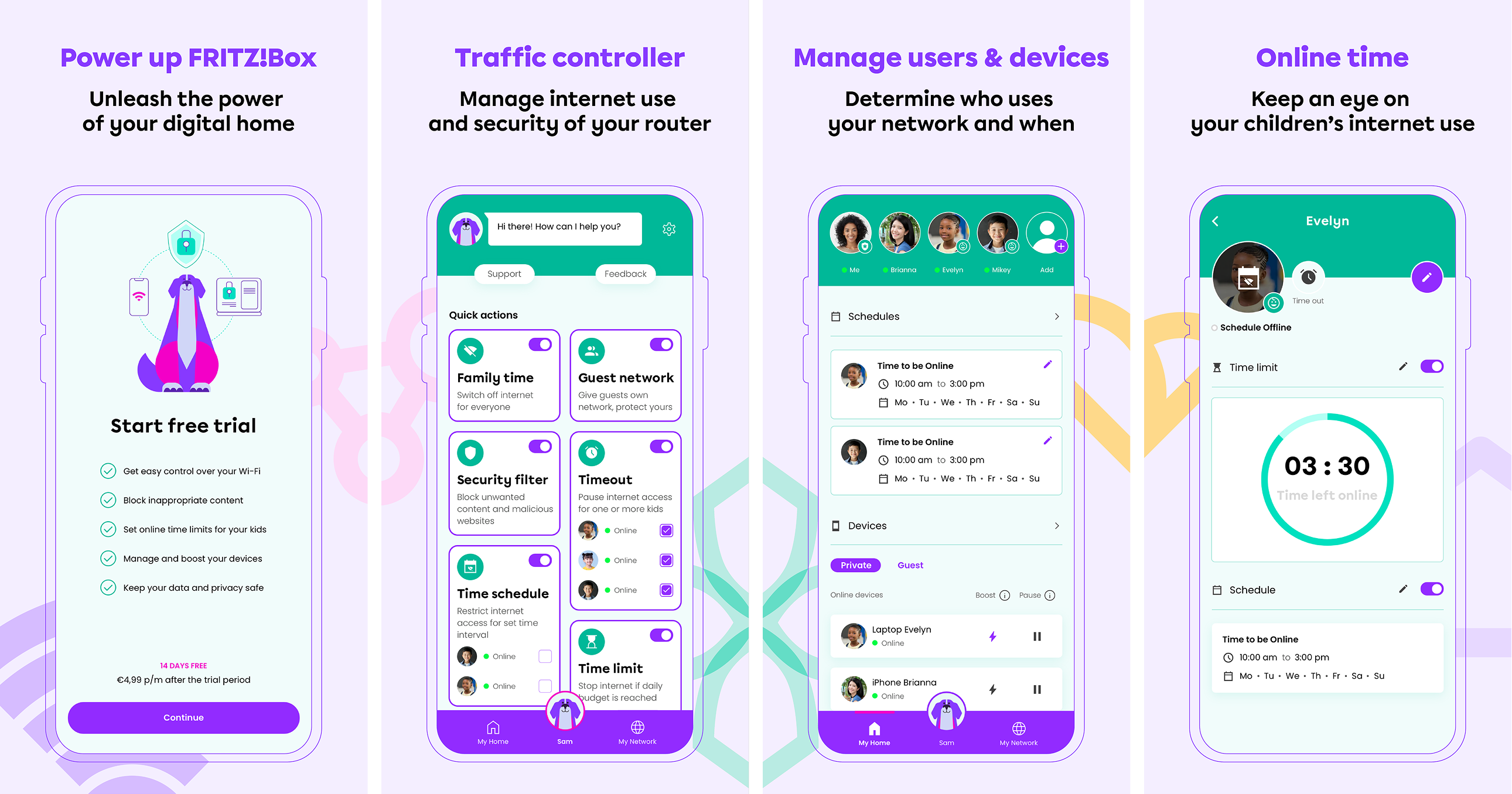
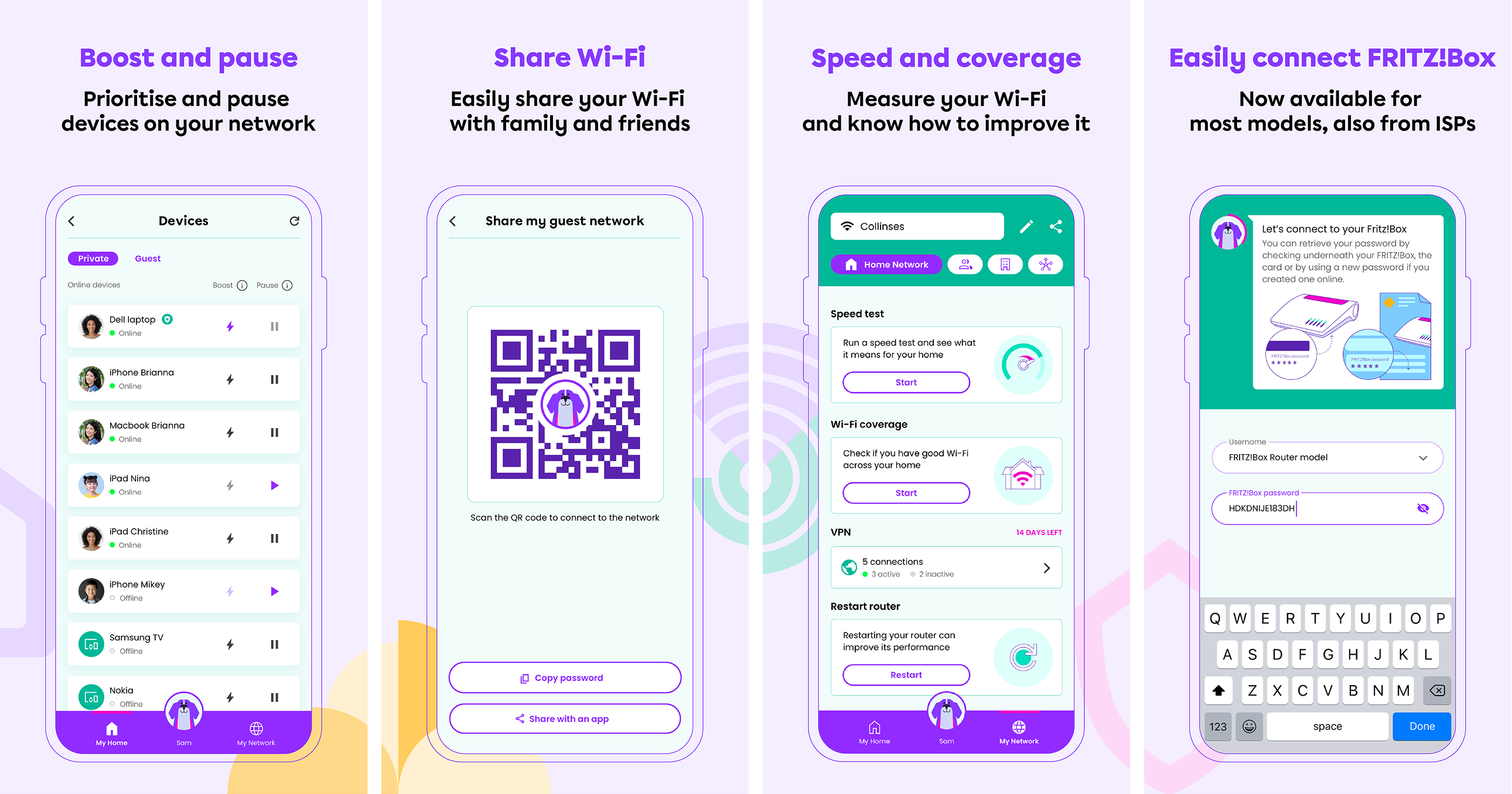
The Gamgee app transforms any router owner into an instant Digital Pro for Home and Family by offering a powerful home network tool and a seamless, all-in-one experience. It simplifies complex configurations and replaces fragmented apps, enabling users to manage devices, set smart parental controls, and optimise network performance effortlessly. For Internet Service Providers, Gamgee presents a feature-rich solution that integrates with existing routers, offering branding opportunities, reducing support costs, and promoting additional services. This platform enhances user satisfaction while empowering ISPs to differentiate their offerings and drive revenue growth. Designed for both B2B and B2B2C markets, Gamgee serves as a versatile solution that meets the needs of businesses and their end-users alike.
As the hands-on Design Leader of this product, I spearheaded both User Experience and Visual Design of its core features, driving the process from initial concept to final execution. I built and led a talented design team, mentoring and guiding two UX/UI designers, along with an illustrator and animator, to maintain a high standard of design quality. By closely collaborating with the User Research team, I integrated valuable insights into our design decisions. Partnering with the development team, I ensured that our designs were both functional and visually compelling, resulting in a seamless user experience that elevated customer satisfaction and fuelled business growth.
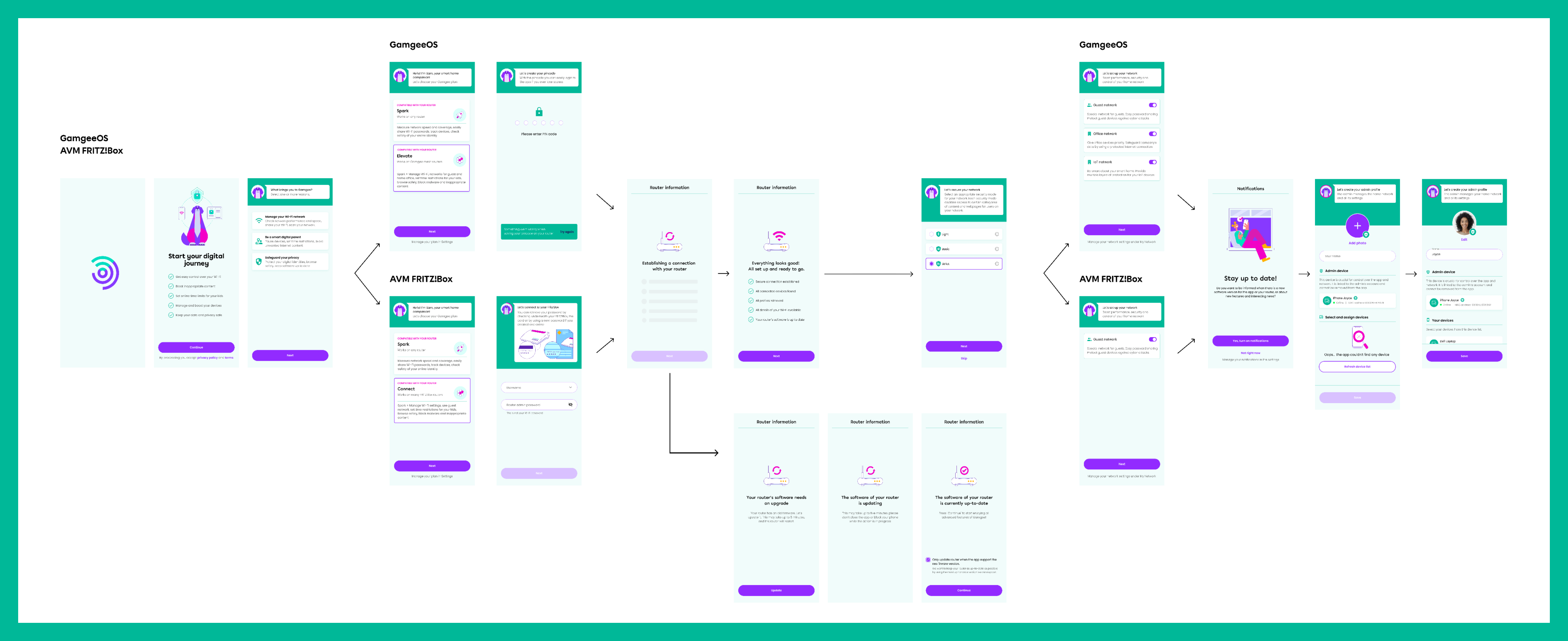
An onboarding flow for GamgeeOS (router-independent solution) and for a popular FRITZ!Box router, showcasing two different user journeys, both resulting in a successful account creation.
Friendly mascot
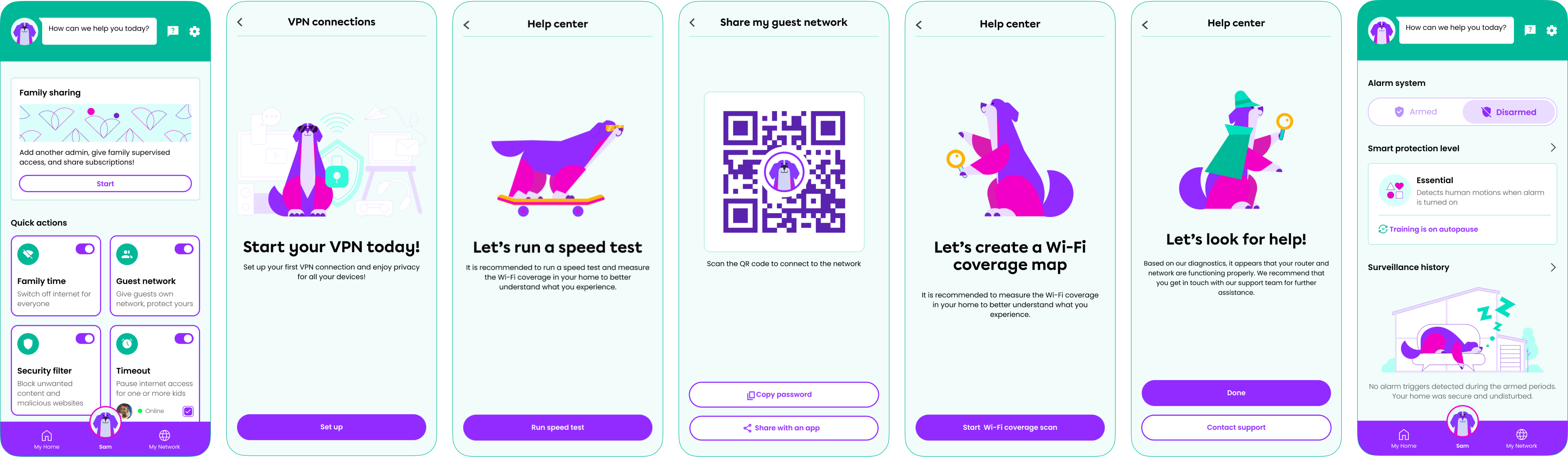
The main bottom navigation button is Gamgee's mascot avatar that leads users to the Help Centre, Settings, Family sharing, and Quick Actions: Family time, Guest network, Timeout, etc. Sam also helps with starting any new flow by providing short and clear explanations, and she also is the main heroine of the app's illustrations and mini-stories.
Gamgee is a digital system for millions of users with a wide range of needs and sensitivities. The most challenging part was to explain new features that were never introduced before to the mass user – Wi-Fi mapping, distinguishing between family members, Home Alarm and Fall Detection.
I've made sure that every step that is potentially not clear for a user is properly explained in the Help Center, and that all the information, guides and FAQs are easily findable. Our friendly mascot Sam (yes, Sam Gamgee :) is the users' companion, assisting with any issue and answering any question.
Sam will guide you through any setup, for example – Wi-Fi Coverage Map
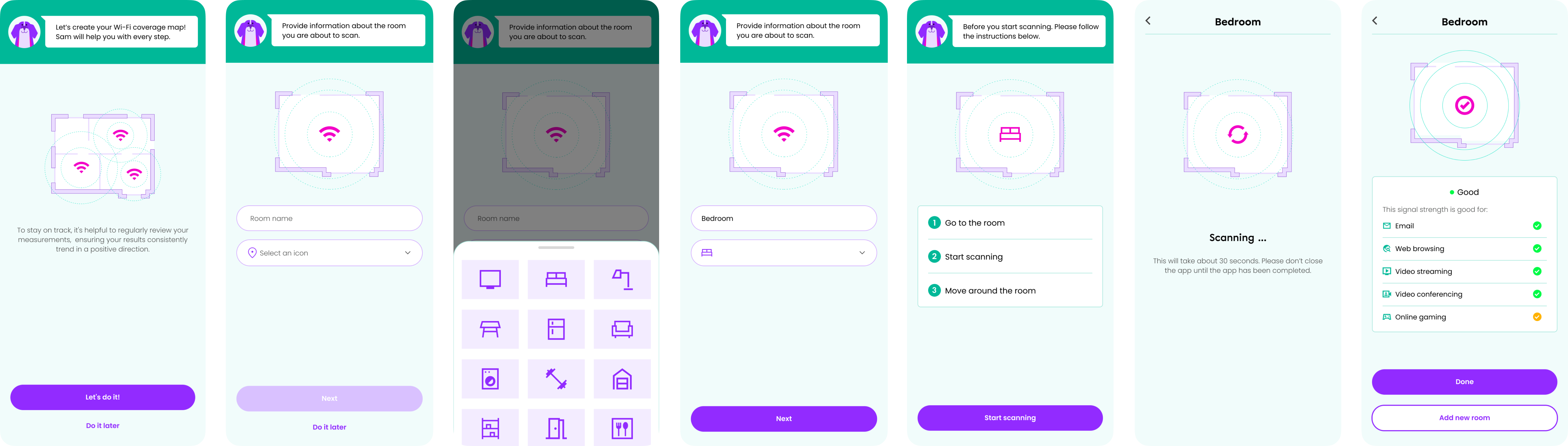
Coverage map
The Coverage Map tool empowers users to optimise their home network by providing a detailed scan of Wi-Fi coverage and signal quality in every room. With this feature, users can easily identify weak spots or areas with poor connectivity, allowing them to pinpoint where improvements are needed (e.g. adding an extender). Whether it's for better streaming, gaming, or working from home, the Coverage Map helps ensure that every corner of the house enjoys strong, reliable Wi-Fi.
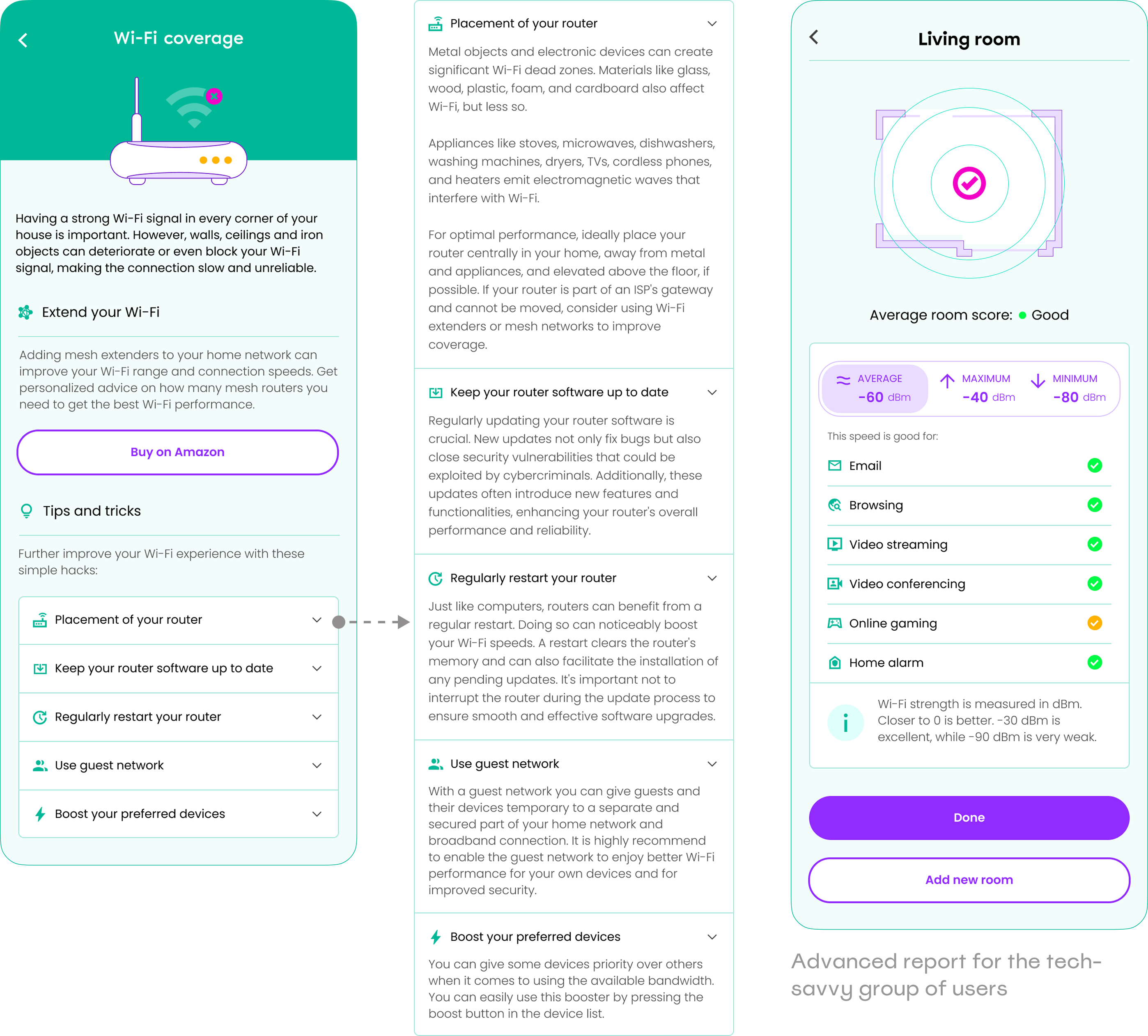
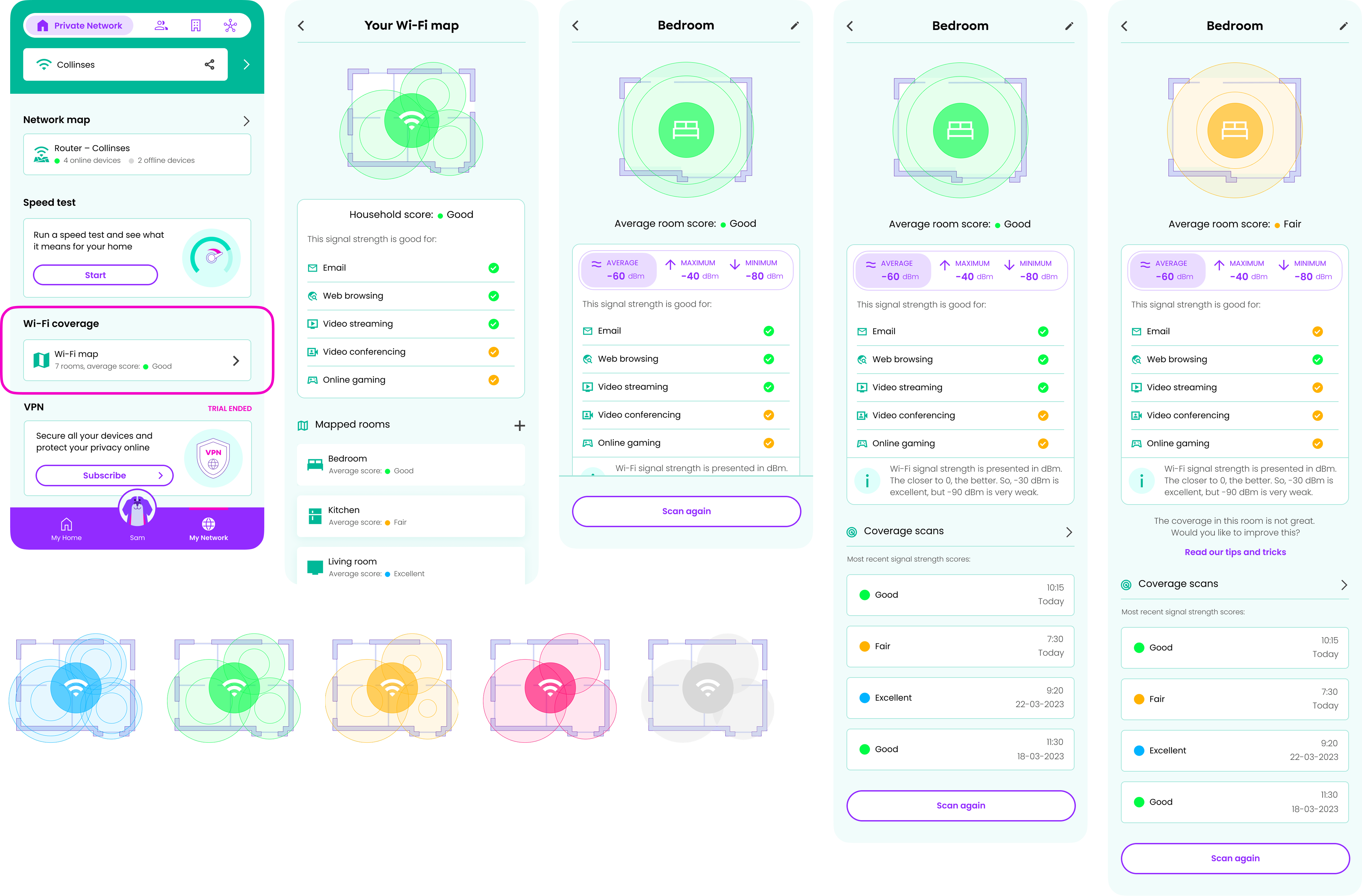
Feature overview
The Wi-Fi Coverage feature offers a comprehensive overview of the household's network strength by mapping all the rooms and generating an average household score. This score is displayed on a general report screen, which also indicates what activities, like streaming or gaming, are feasible with the current signal strength. Each room's average signal strength is listed, and their detail pages provide in-depth reports on individual rooms, showing average, maximum, and minimum signal strength in separate tabs. The feature also explains the signal strength measurement unit, dBm, clarifying that although values are negative, it doesn't mean poor performance. Additionally, the detail page includes a history of coverage scans, marked with colour indicators of signal quality and time stamps for easy reference.
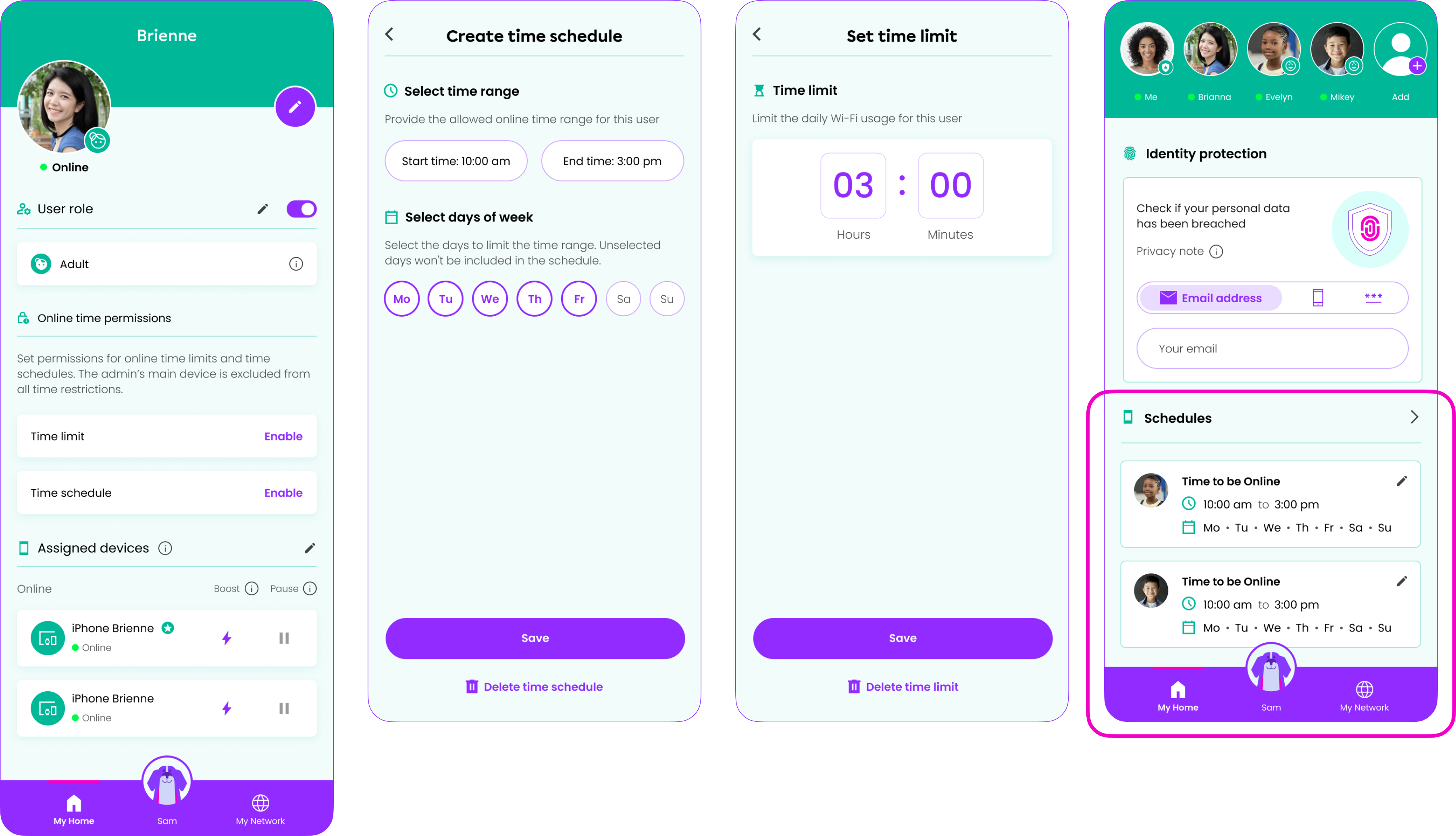
Parental controls
The Parental Controls feature in the Gamgee app offers parents peace of mind by allowing them to set time limits and schedules for their children's online activities. With this tool, parents can easily manage and monitor screen time, ensuring that kids stay focused on their studies or enjoy family time without distractions. The feature also helps create a balanced digital environment, giving parents control over when and how their children access the internet, supporting healthier online habits and a safer home network.
Family sharing
The Family Sharing feature allows the Gamgee users to seamlessly manage their home network as a team. They can add another admin to help oversee network activity, grant family members supervised access to specific settings, and even share subscriptions across devices. This feature makes it easy to collaborate on managing the users' household's internet usage, ensuring everyone stays connected while maintaining control and security. Whether it's monitoring online time or sharing premium features, Family Sharing brings convenience and flexibility to every family's digital life.
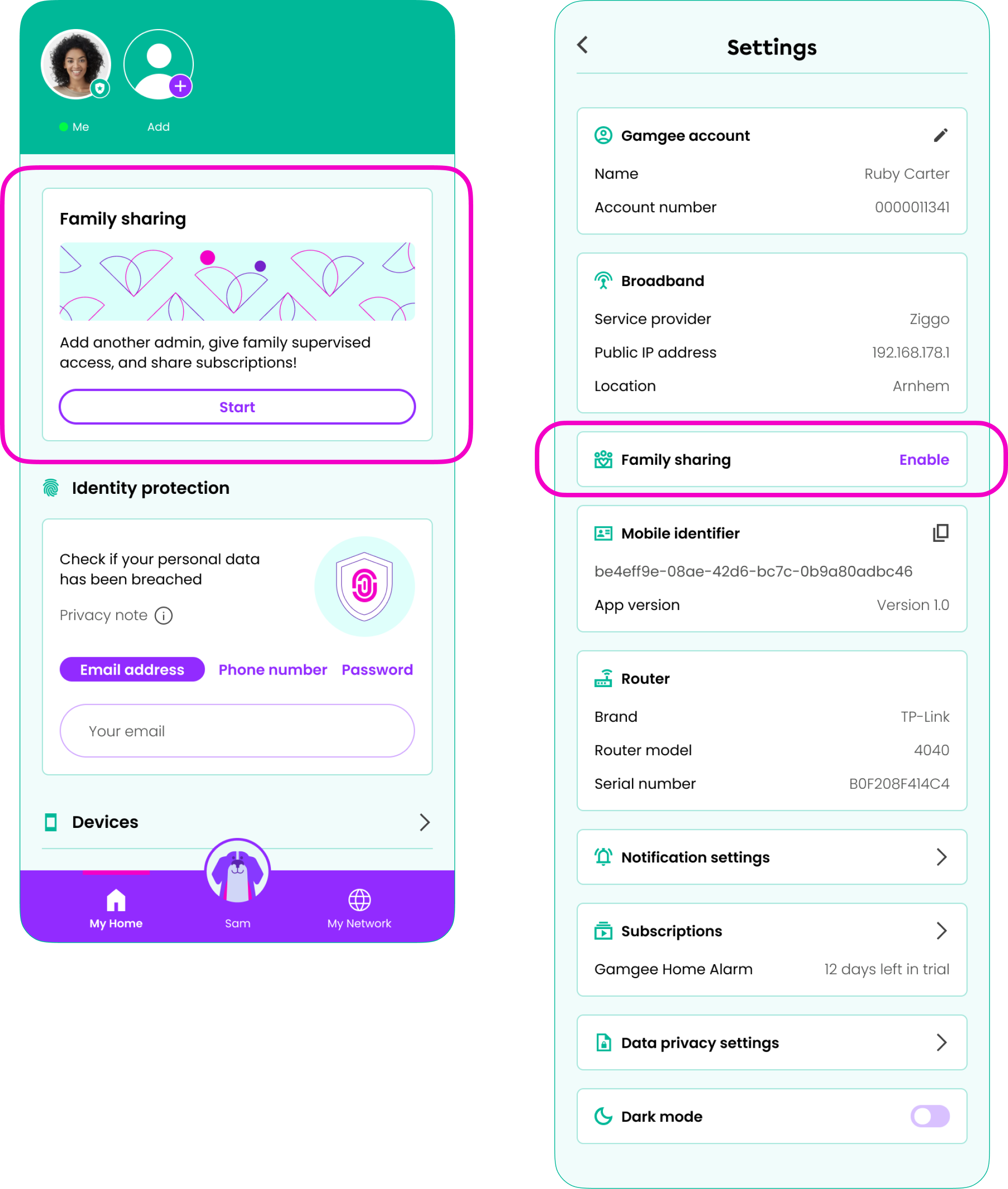
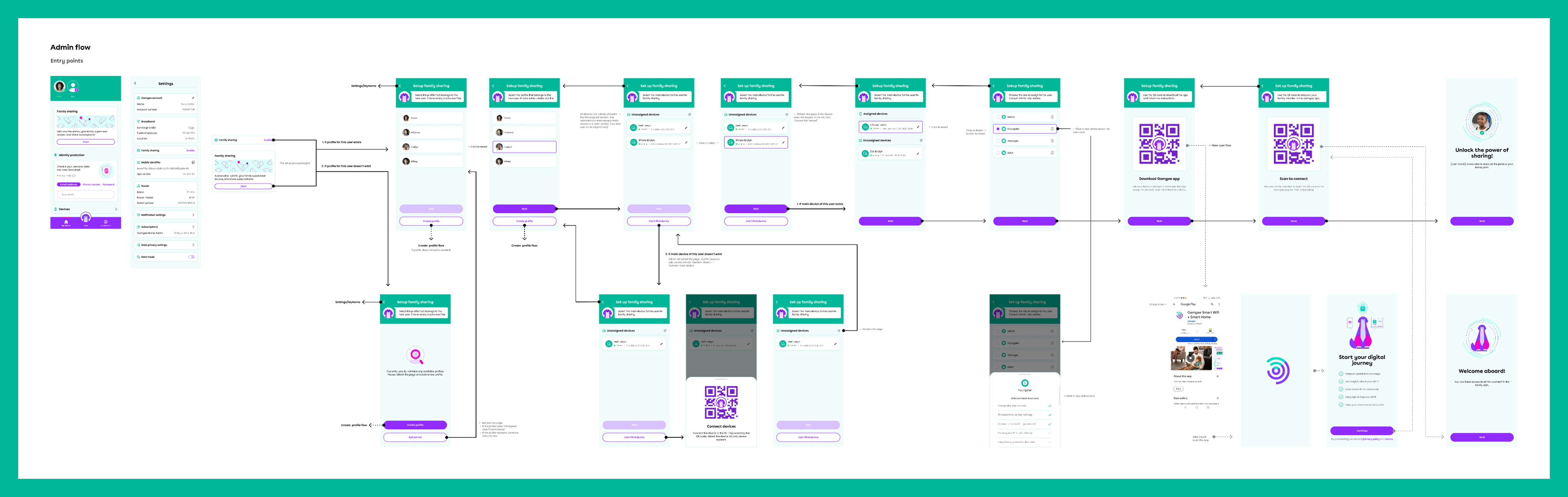
The Family Sharing UX flow is designed to be intuitive and flexible, accommodating a variety of user scenarios. It guides the primary user through adding another admin with full control, setting up supervised access for children with customizable restrictions, and sharing subscriptions with family members. The flow accounts for different use cases, such as managing multiple devices, adjusting permissions based on age, and handling subscription renewals. It also includes clear prompts and safeguards to ensure that access levels are correctly assigned and easily modified as family needs evolve, making the experience seamless and secure for all users.
Security filters
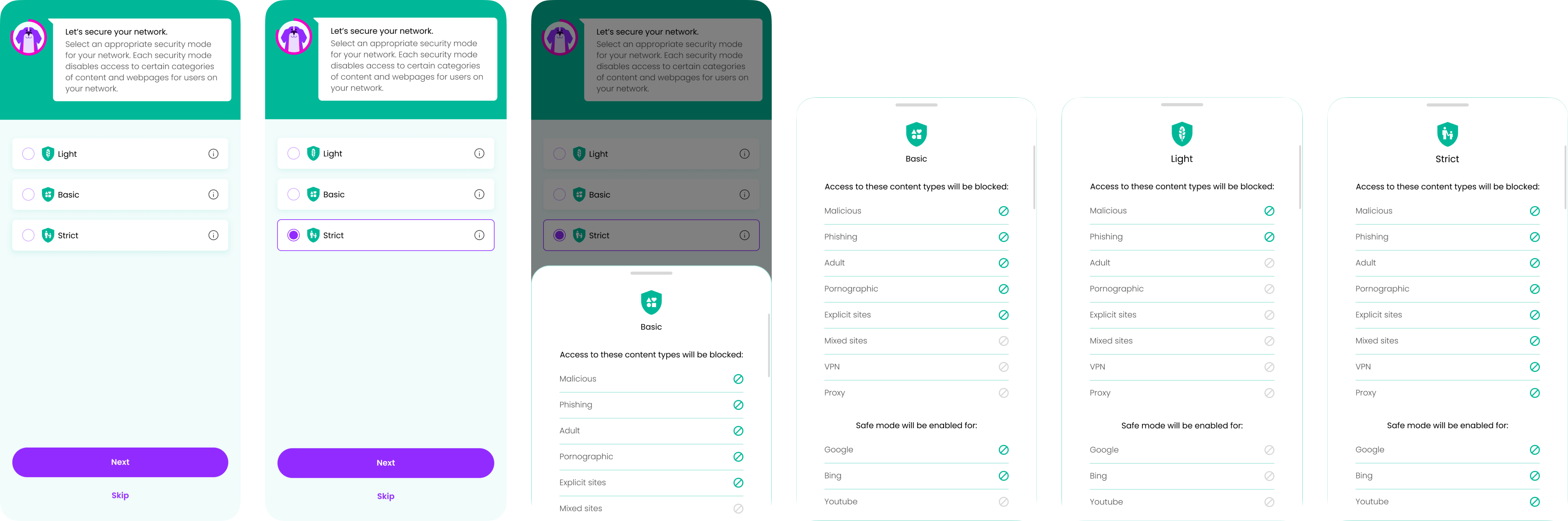
The Security Filters feature in the app enables users to easily customise users' online protection levels with three distinct settings: Basic, Light, and Strict. Whether they need minimal filtering for unrestricted browsing, moderate control to block potentially harmful content, or strict filtering for maximum security, the feature is designed to accommodate various needs. It ensures that each option is clearly explained, allowing users to select the most suitable protection level for their household. Security filters are quickly adjustable, giving users the flexibility to change settings as their needs evolve, all while maintaining a protected and seamless browsing experience.
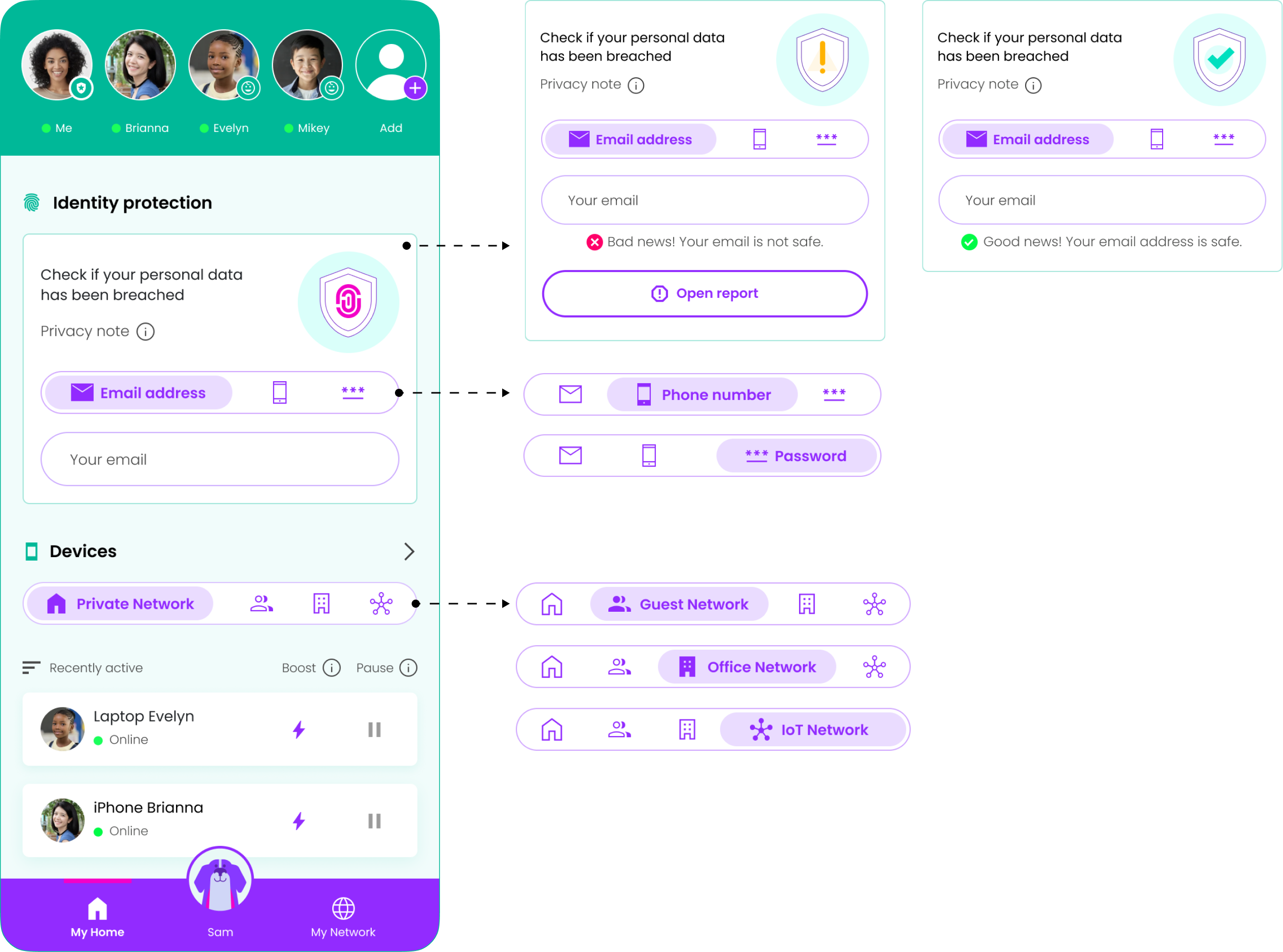
Identity protection, Networks, Boost & Pause for devices
The Identity Protection feature provides users with a quick and efficient way to check if their personal data – such as email addresses, phone numbers, or passwords – has been compromised in any data breaches. With just a few taps, users can run a scan that alerts them to potential breaches and offers guidance on how to secure their information.
The Network Switch Tab feature allows users to seamlessly toggle between different networks, such as Private, Guest, Office, and IoT, each tailored to specific needs. This functionality groups devices into their designated networks, ensuring that each operates under its own set of customized settings and security modes.
The Boosting and Pausing Devices feature empowers users to manage their Wi-Fi distribution effortlessly, prioritizing certain devices while temporarily pausing others. With just a tap, users can allocate "more Wi-Fi" to devices that need it most, like a work laptop during an important video call, ensuring optimal performance. Simultaneously, less critical devices can be paused to reduce bandwidth usage, creating a customized and efficient network experience.
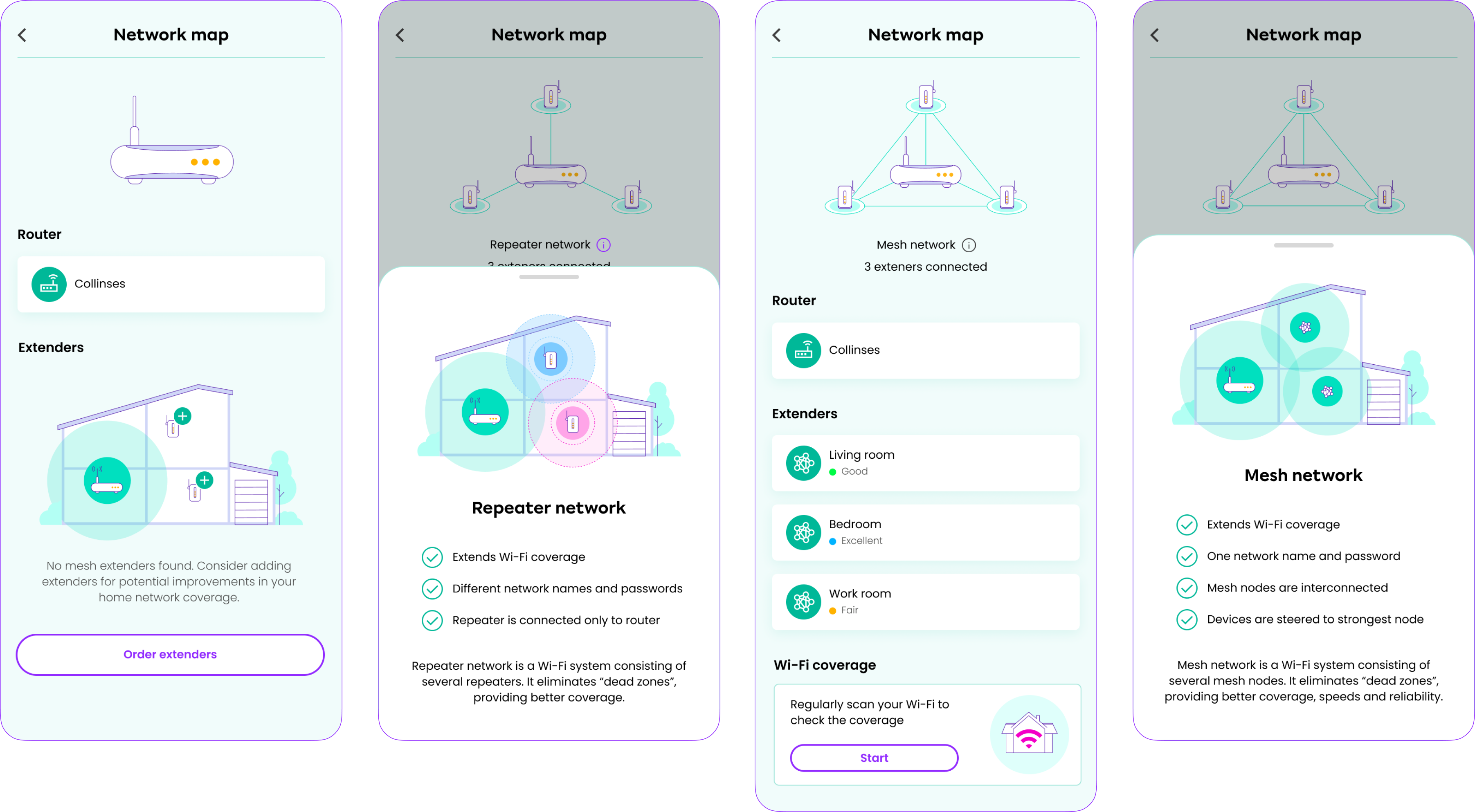
Network map
The Network Map feature in the app allows users to enhance their home Wi-Fi setup for optimal coverage, speed, and reliability. If a user only has a router, they can easily add extenders to boost coverage across their home. For even better performance, users can create a Repeater Network that extends the signal, or opt for an advanced Mesh Network where mesh nodes are interconnected. This ensures that devices are automatically steered to the strongest node, providing seamless, reliable connectivity throughout the entire home.
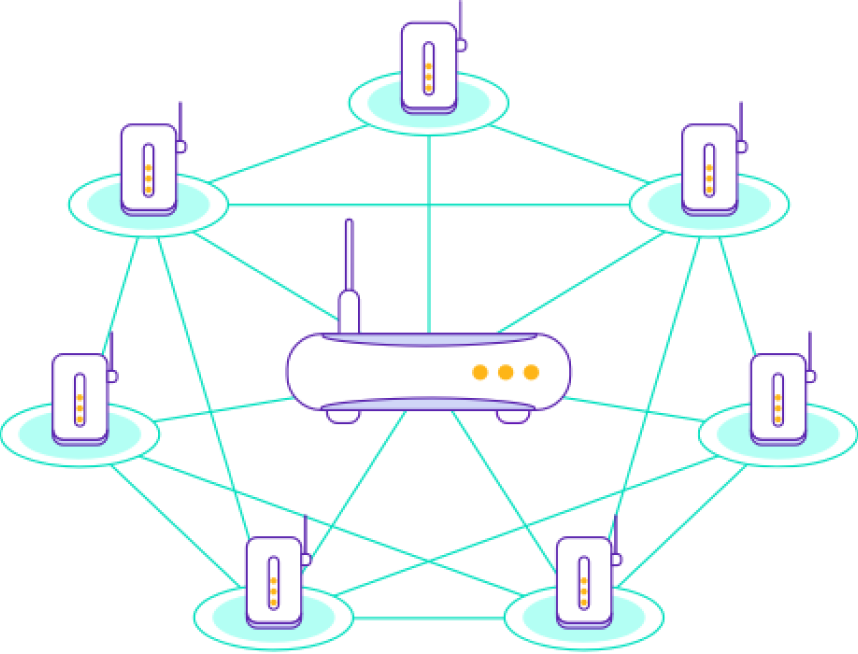
An advanced Mesh Network solution with 6 interconnected mesh extenders
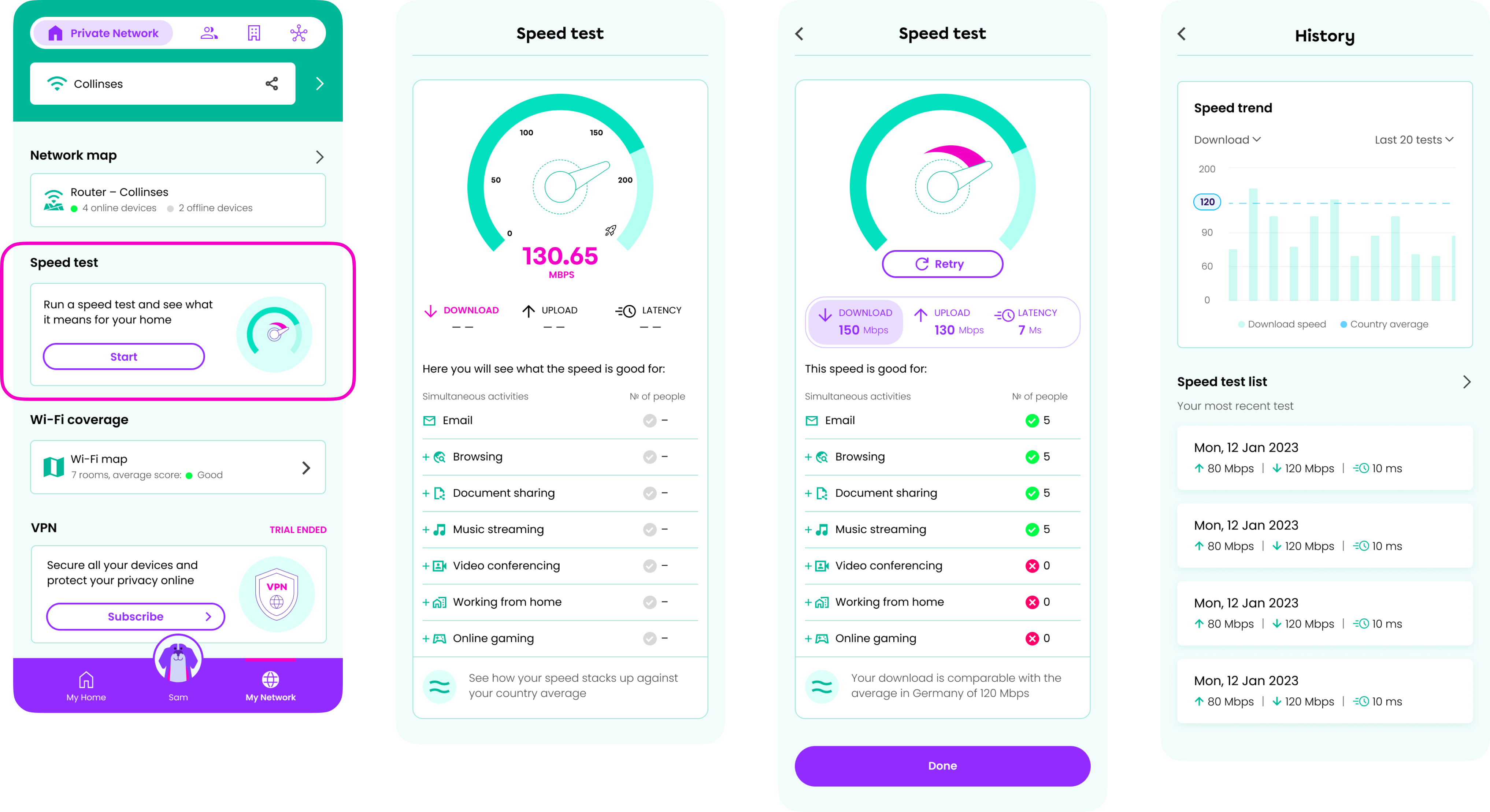
Speed test
The Speed Test feature empowers users to assess their internet performance, showing what activities their current speed can support, such as video conferencing, working from home, or gaming, and for how many people. The test report provides detailed metrics on download, upload, and latency speeds, comparing them to the average benchmark speeds in their country. Users can track their speed performance over time with the speed test history, which reveals trends based on multiple tests and includes a list of the most recent speed tests for easy reference.
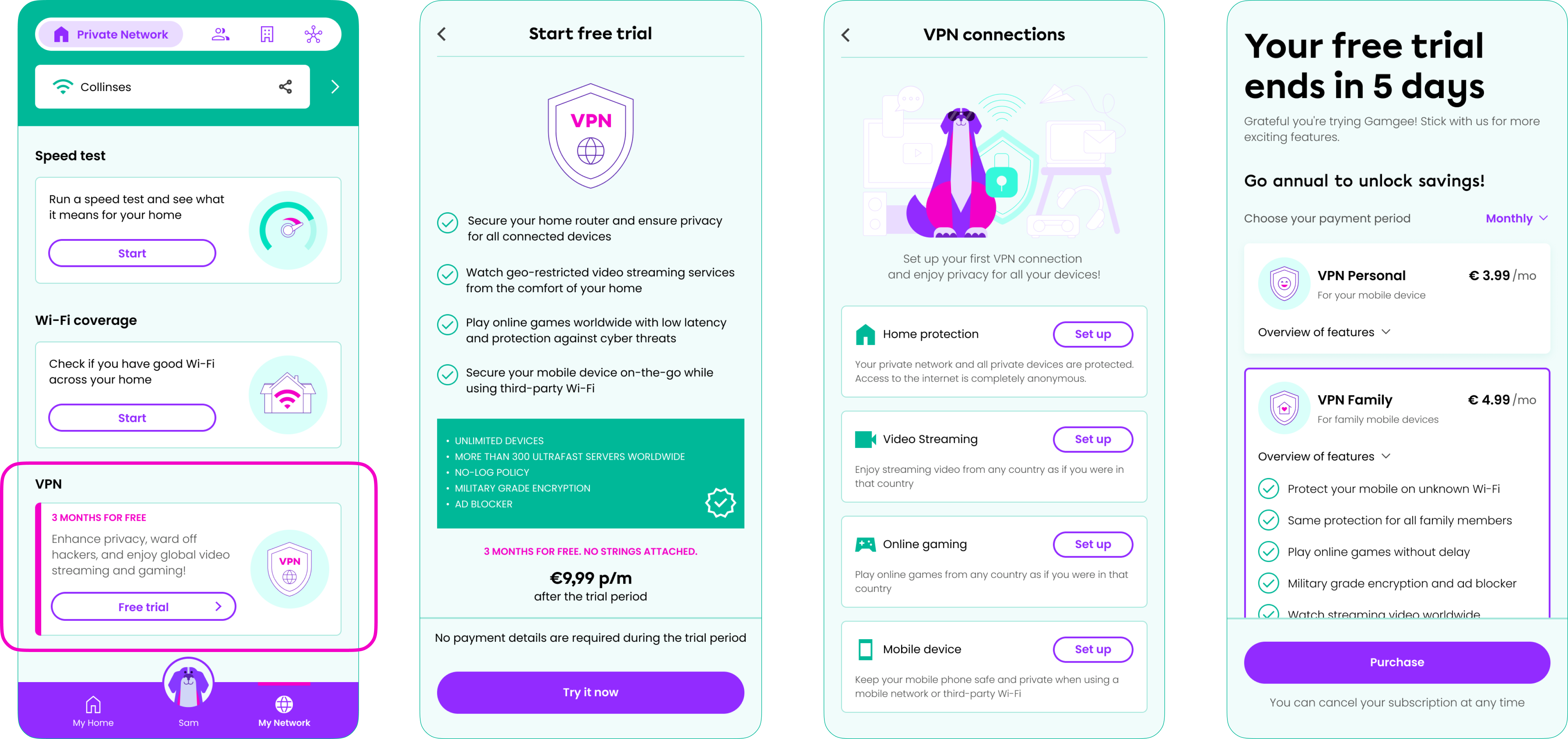
VPN
The Gamgee app's VPN feature provides robust security and privacy for all devices connected to the users' home router, ensuring safe browsing, video streaming, online gaming, and mobile device usage on third-party networks. Users enjoy a 3-month free trial to experience full protection, after which a paywall introduces four subscription plans tailored to different needs. The user can select their preferred payment period, choosing between monthly, semi-annual, and annual options, making it easy to continue safeguarding their digital activities with a plan that suits their budget.
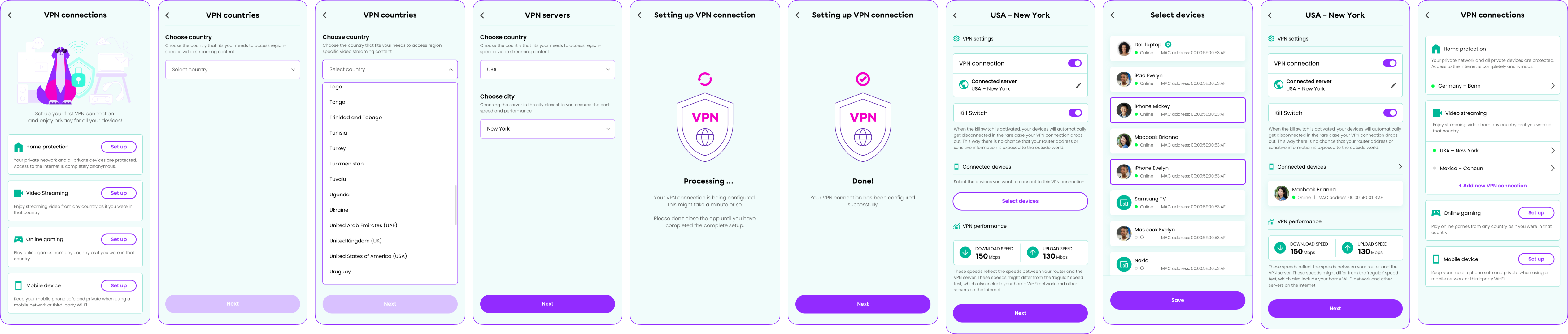
A flow of adding a new VPN connection by choosing a country, a city (server), and the devices the user wants to connect to this VPN. The flow also introduces features like Kill Switch, to automatically disconnect the devices in the rare case the VPN connection drops out, and VPN Performance that reflects the speeds between the router and the VPN server.
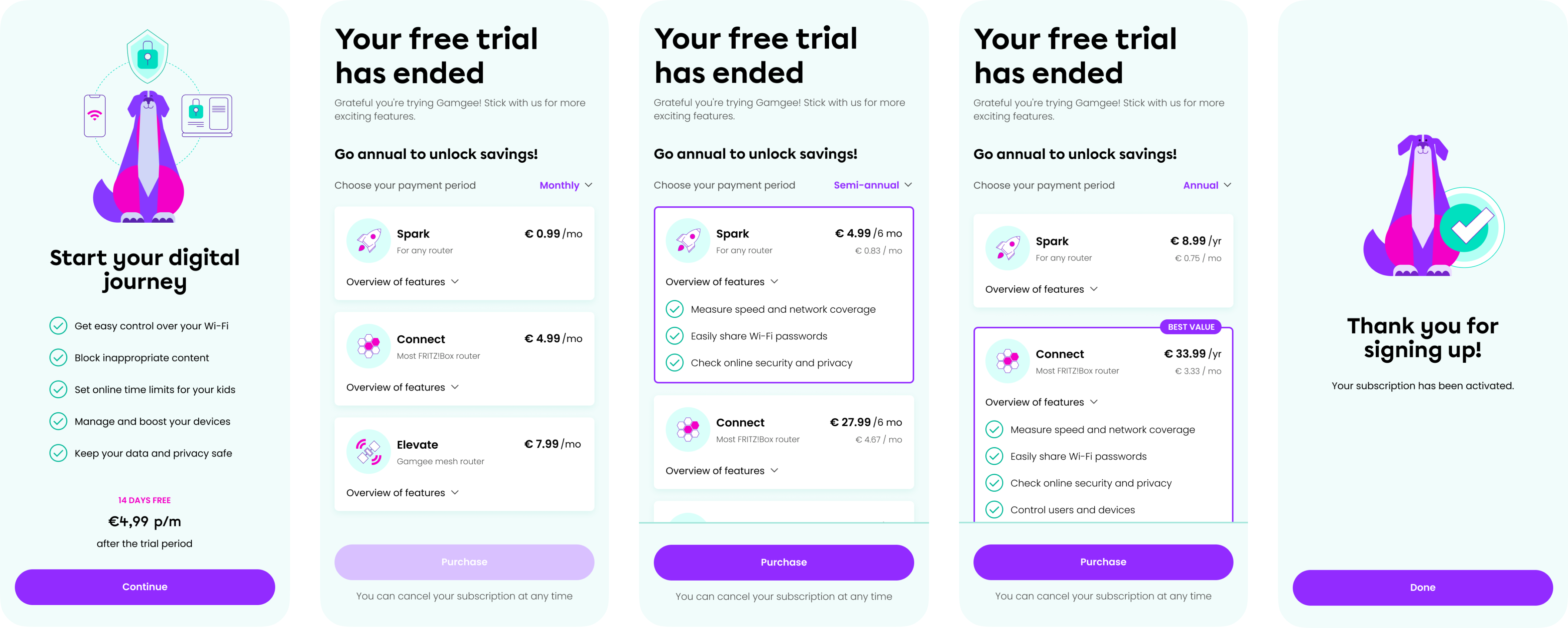
Subscription
The app's Subscription flow begins with a 14-day free trial, giving users full access to all features. After the trial, a paywall introduces three subscription plans, each tailored to different user needs. Users can select their preferred payment period, choosing from monthly, semi-annual, or annual options.
Gamgee consolidates Wireless Networking, Access Control, and Smart Home Automation into a single, highly marketable platform. By aligning our Design, Development, and Research teams, I successfully translated complex network management into an accessible, all-in-one consumer product. This strategic approach allowed us to serve both domestic households and remote-work environments, effectively expanding our target audience. Ultimately, by packaging advanced technical tools inside a simple, intuitive interface, we lowered the barrier to entry, driving higher user adoption and positioning Gamgee as a sticky, comprehensive ecosystem rather than a single-use utility.